
Menu
Menu
Menu
Why Most Legacy Apps Fail at UX (And How to Fix It)
Why Most Legacy Apps Fail at UX (And How to Fix It)
Posted on
Legacy Modernization
Expert Opinion
Posted at
Jan 5, 2026
Jan 5, 2026
Min read
10

I hope you found this post valuable. If you’re looking for proven frontend and design expertise to elevate your product, feel free to reach out.
I hope you found this post valuable. If you’re looking for proven frontend and design expertise to elevate your product, feel free to reach out.
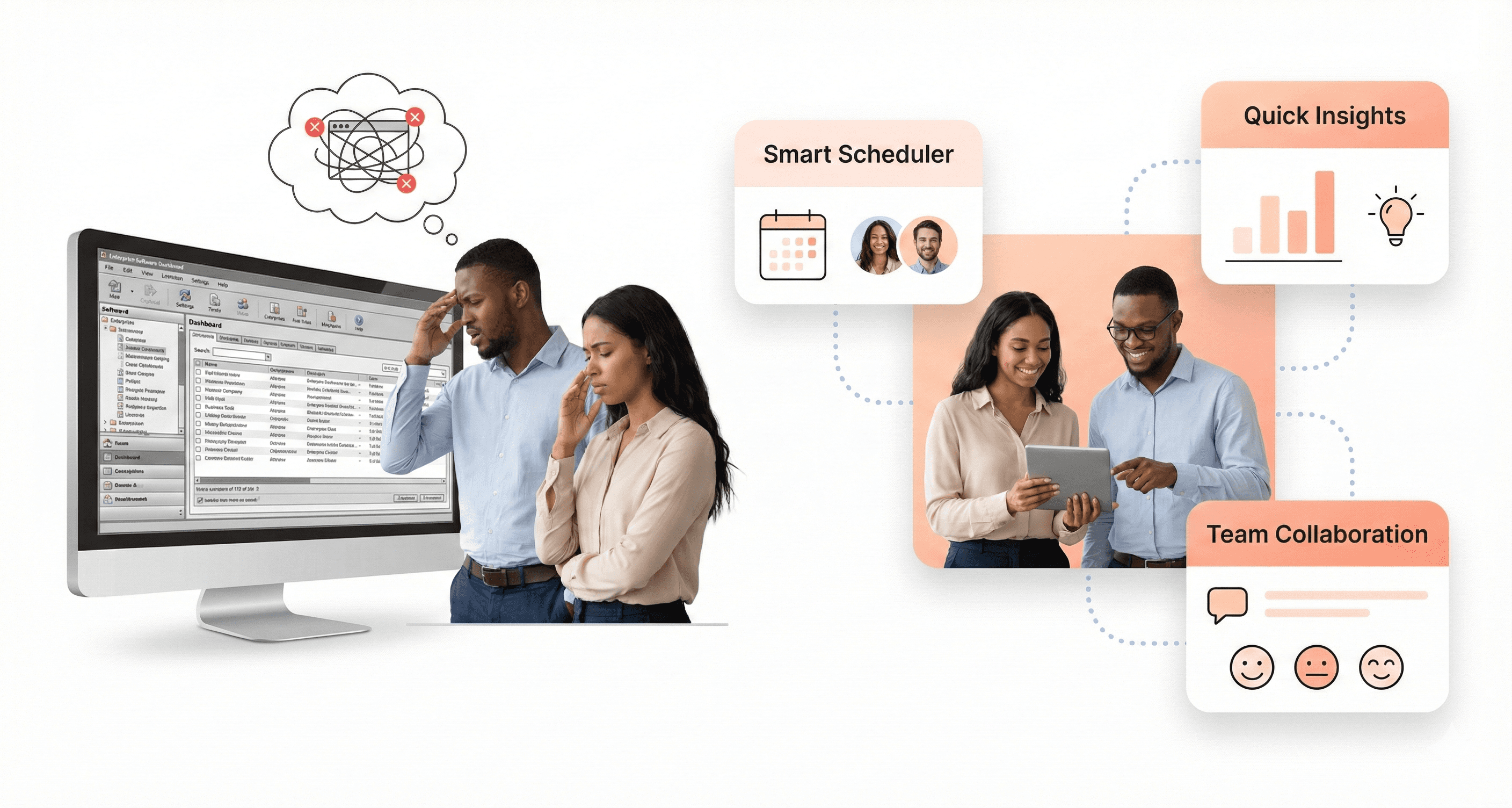
Your legacy app is bleeding users, frustrating employees, and costing your business money. Every clunky interface, confusing navigation flow, and outdated visual design pushes people away from the software they need to use daily.
This guide is for product managers, UX designers, and business leaders dealing with legacy applications that perform poorly but can't be rebuilt overnight. You're stuck between user complaints and budget constraints, searching for practical ways to improve without starting from scratch.
We'll explore why legacy apps create UX problems that hurt business performance and examine the root causes behind these failures. You'll discover quick UX improvements that don't require full redesigns – simple changes that deliver immediate results. Finally, we'll cover strategic solutions for long-term legacy app modernization that help you plan sustainable improvements while working within real-world constraints.
Your legacy software doesn't have to stay broken. Small, smart changes can make a big difference for your users and your bottom line.
Why Legacy Apps Create UX Problems That Hurt Business Performance
How Legacy Constraints Limit Modern Design Decisions
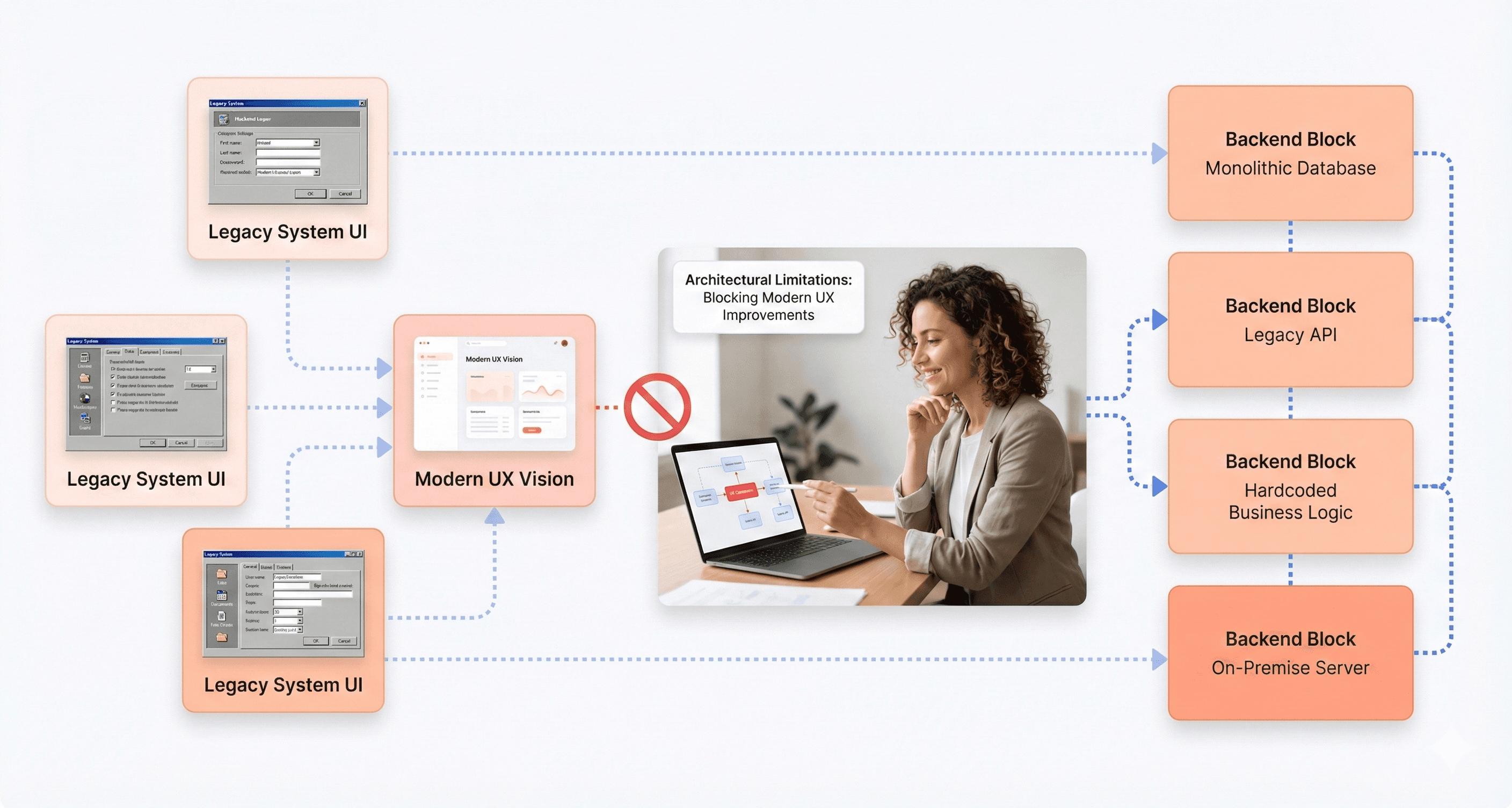
Your legacy applications carry decades of architectural decisions that create invisible walls around modern UX design. When you're dealing with enterprise software built years ago, you're essentially working within the constraints of ancient specifications - much like how the size of Roman horse chariots ultimately determined the dimensions of Space Shuttle booster rockets.
These legacy constraints force your UX designers to work backwards from existing functionality rather than forward from user needs. Your development teams can't simply implement modern design patterns because the underlying architecture wasn't built to support them. Instead of creating intuitive interfaces, you're stuck patching together workarounds that maintain backward compatibility while trying to improve usability.
The most precise interface might be a command line, but your users need graphical interfaces that don't require learning complex syntax. However, your legacy systems often trap you between these two extremes - too complex for intuitive use, yet not powerful enough for expert users to work efficiently.
The Hidden Costs of Poor Enterprise Software Usability
Your organization faces substantial financial impact when legacy app UX problems persist across your business operations. While you might think legacy systems are "cheap" because they're already paid for, the reality is that poor usability creates cascading costs throughout your organization.
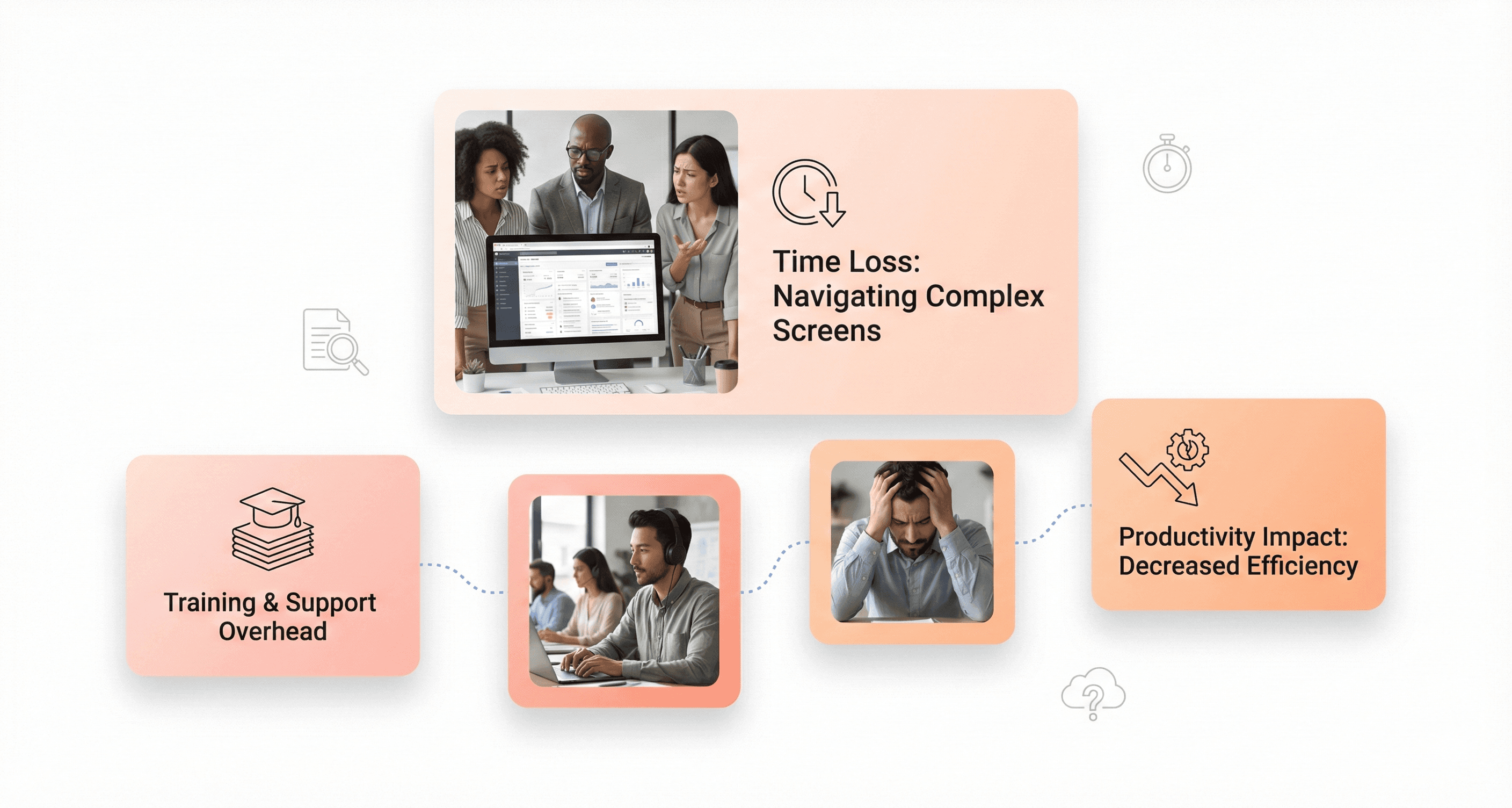
Your employees struggle with complex interfaces that weren't designed with modern UX principles in mind. This leads to reduced performance as your staff spends more time figuring out how to accomplish basic tasks rather than focusing on their actual work. You'll find that:
Training becomes an ongoing expense, as you need customized programs for each legacy application
Employee productivity drops when interfaces are counterintuitive or require multiple steps for simple actions
Software adoption becomes problematic, forcing you to invest in continuous retraining programmes.
Your inability to scale training efficiently impacts your operational costs
Your Total Cost of Ownership (TCO) increases dramatically when you factor in these hidden usability costs. The specialized skills needed to maintain and train users on legacy interfaces become increasingly expensive and harder to find in today's job market.
When Backward Compatibility Becomes a User Experience Trap
Your commitment to backward compatibility often becomes the biggest obstacle to improving user experience in your legacy applications. You face the challenge that your users expect improvements, but they also resist dramatic changes that would require learning completely new interfaces from scratch.
This creates a UX trap where you can only make incremental tweaks rather than implementing comprehensive design improvements. Your users have become familiar with existing workflows, even if those workflows are inefficient or counterintuitive by modern standards. When companies like Microsoft tried to dramatically change Windows 8 by removing the familiar toolbar and start button, user backlash forced them to restore these elements in Windows 10.
Your organization likely follows the mentality of "if it ain't broken, don't fix it," especially when dealing with expensive systems that still function adequately. This conservative approach means you maintain outdated user interfaces simply because changing them would disrupt established user habits, even when those interfaces significantly hamper productivity.
How Complex Customization Requirements Create Interface Chaos
Your enterprise software's customization capabilities, while valuable for business processes, create significant UX challenges that compound over time. Every implementation of your legacy application ends up looking completely different across departments or client organizations, making it impossible to create standardized training materials or consistent user experiences.
Your customization requirements force you to accommodate countless use cases across multiple sectors, making interface simplification nearly impossible. Unlike consumer software designed for specific user personas, your enterprise applications must serve diverse user types with varying skill levels and requirements. This leads to interfaces cluttered with options and features that may be crucial for some users but overwhelming for others.
Your complex ecosystem includes additional infrastructure components that aren't up to date, creating further constraints on interface design. You may lack the internal expertise to update outdated technology because the original implementers have moved on, leaving you with systems that limit your ability to modernise the user experience. These legacy systems increase ownership costs as your administrators manage multiple overlapping systems simultaneously, creating interface inconsistencies that confuse users and reduce overall efficiency.
The Root Causes Behind Legacy App UX Failures
Misaligned User Personas Between Buyers and End Users
You're likely dealing with a fundamental disconnect in your legacy app development process. The people purchasing your enterprise software are rarely the same individuals who will actually use it day-to-day. This buyer-user gap creates a massive legacy app UX problem that continues to plague organizations.
When managers, shareholders, and department heads make software decisions, they naturally prioritize features that demonstrate business value over usability concerns. Your actual users – the employees who spend hours navigating these systems – find themselves stuck with interfaces designed around executive priorities rather than their workflow needs.
This misalignment becomes particularly problematic because the essential user research process that drives effective UX design gets severely compromised. You can't gather meaningful insights about user demographics and their unique problems when the decision-makers aren't the ones experiencing daily friction points. The result is legacy software that seems completely unaware of your users' actual needs.
Over-Engineered Solutions That Prioritize Features Over Usability
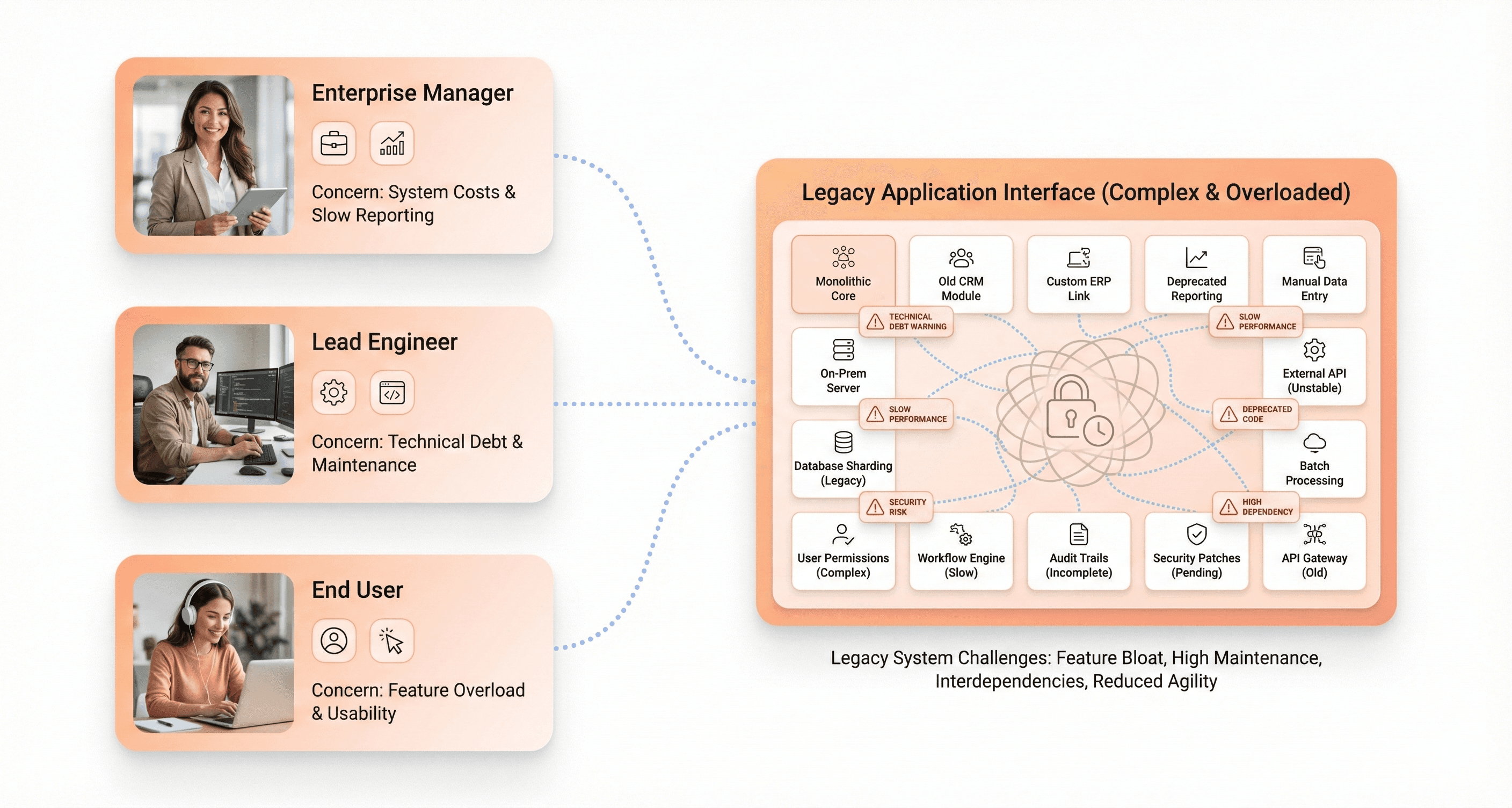
Your legacy applications suffer from feature bloat that directly undermines user experience. When multiple stakeholders get involved in the design process, you end up with overloaded interfaces packed with redundant options and complex layouts that make essential functions nearly impossible to discover.
This over-engineering manifests in several ways that hurt your legacy app user experience. You'll find too many menus cluttering your interface, critical functions buried within deep hierarchies, and inefficient search and filtering capabilities that leave users frustrated. Common tasks that should take seconds now require excessive clicks through complicated workflows.
The problem compounds when your legacy system tries to accommodate everyone's requests simultaneously. Rather than progressive disclosure that shows only relevant features when needed, you get everything-everywhere-all-at-once interfaces that overwhelm users and slow down productivity.
Outdated Security and Stability Requirements That Limit Innovation
Your legacy applications are trapped by security frameworks and stability requirements that were established decades ago. These systems were originally implemented as "forever solutions" without considering the user experience implications of their rigid structures.
The challenge you face is that updating enterprise systems involves significant risk factors. When you attempt to implement new design changes, there's always the possibility of breaking older parts of your software, which could disrupt critical business operations. This creates a conservative environment where decision-makers opt for safer but less innovative designs rather than pursuing meaningful UX improvements.
Your stakeholders resist experimentation because time costs money, and they can't easily see empirical data proving that UX investments deliver returns. This resistance to change keeps your legacy apps locked in outdated interface patterns that fail to meet modern user expectations.
Legacy System Dependencies That Block Modern Interface Updates
You're constrained by the interconnected nature of your legacy systems. These platforms comprise several integrated tools and programs that should run seamlessly together, but their dependencies make interface modernization extremely challenging.
The reality you're dealing with is that completely scrapping old software and starting fresh would often be more beneficial and less time-consuming. However, integration issues rarely allow this approach. Instead, you must work within the confines of existing legacy system dependencies to create new, functional interfaces without breaking critical connections.
Your users themselves sometimes create additional resistance to change. It's common for employees to resist learning new systems when their current tools "work well enough," even if those systems have glaring flaws. This user pushback, combined with technical constraints, creates a perfect storm that blocks modern interface updates.
The lengthy release cycles compound this problem further. It can take years to design and develop updates for enterprise systems, particularly when you must repeatedly integrate small changes that need careful testing to ensure they don't accidentally break attached programs. By the time your improvements are implemented, they may already be outdated compared to modern UX standards.
Quick UX Improvements That Don't Require Full Redesigns
Streamline Navigation and Reduce Cognitive Overload
Legacy apps often suffer from bloated, outdated navigation structures that leave users feeling lost and overwhelmed. You can quickly address these legacy app UX problems by implementing targeted fixes that don't require complete rebuilds.
Start by renaming navigation labels for clarity. Replace vague terms like "Documents" with specific, context-aware labels such as "Patient Records" or "Project Files" that match your users' mental models. Remove rarely used or outdated menu items that only add clutter and confusion to your legacy application user experience.
Add visual hierarchy to your navigation by implementing section headings, icons, or logical groupings. This helps users understand the relationship between different areas of your application. If your legacy app lacks breadcrumb trails, introduce them to help users understand their current location within the system.
Consider implementing a layered navigation approach similar to successful modern apps. Use a persistent sidebar for core modules, a top horizontal menu for task-focused actions, and contextual dropdowns to separate different types of content. This prevents any single navigation area from becoming overcrowded and helps users maintain their sense of control when moving through your legacy system.
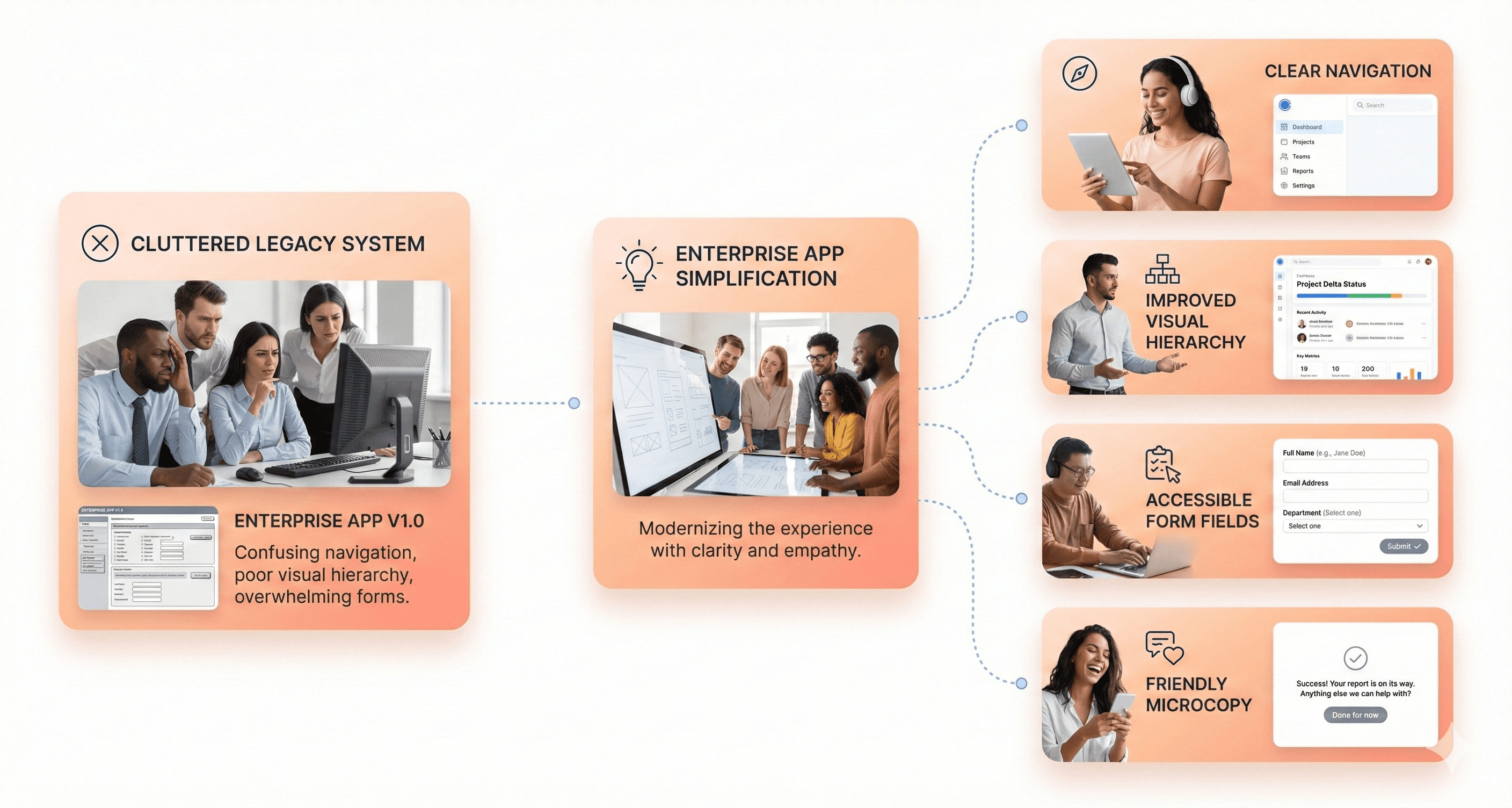
Improve Visual Hierarchy to Guide User Attention
Many outdated software UX issues stem from interfaces that present all information with equal visual weight, overwhelming users with too much data at once. You can dramatically improve user focus through strategic visual hierarchy improvements.
Increase contrast between headers and body text to make content scanning easier. Use generous spacing and logical groupings to chunk related information together, making complex screens more digestible. Highlight key actions like "Submit" or "Next" buttons with distinct styling that draws user attention to primary tasks.
Suppress rarely used fields or secondary actions by using smaller fonts, lighter colors, or collapsible sections. This reduces visual noise while keeping functionality accessible when needed. Apply consistent typographic styling throughout your application, use larger, bold text for section headers and smaller, lighter weights for subheadings and labels.
Structure your layouts to guide user focus naturally. Body text should remain minimal and functional, letting clear headings direct attention to the most important sections. This approach helps users absorb information quickly and understand content priorities without requiring extensive training.
Update Confusing Language and Eliminate Technical Jargon
Outdated microcopy is a silent killer in legacy application user experience, often featuring formal, vague language or technical jargon that no longer reflects how users think or communicate.
Replace system-centric jargon with plain language that users actually understand. Transform phrases like "Initiate Action Sequence" into simple "Start Process" commands. Convert technical terms into user-friendly language that matches your audience's vocabulary and experience level.
Add helpful tooltips or inline guidance near complex features to provide context without cluttering the interface. Rewrite error messages to be friendly, clear, and actionable rather than displaying cryptic system codes or blame-oriented language.
Focus on creating user-centric labels that describe benefits or outcomes rather than internal system functions. Instead of "Database Query Module," use "Search Customer Records." This shift helps users immediately understand what each feature accomplishes and how it relates to their goals.
Fix Basic Accessibility Issues for Better Usability
Many legacy systems predate modern accessibility standards or ignored them altogether during development. You don't need to wait for a complete redesign to start improving legacy system modernization through basic accessibility fixes.
Improve text contrast ratios to ensure better readability across different devices and lighting conditions. Add descriptive alt text to important images and icons so screen readers can convey meaningful information to users with visual impairments.
Ensure form labels are properly associated with their corresponding inputs using the "for" attribute. This simple change makes forms much more usable for both assistive technology users and people using touch devices, as clicking labels will activate the associated form fields.
Add proper focus states and keyboard navigation support where missing. Implement clear visual indicators when users tab through interactive elements, and ensure all functionality is accessible without a mouse. These improvements benefit everyone, not just users with disabilities, by providing multiple ways to interact with your legacy application.
Strategic Solutions for Long-Term Legacy App Modernization
Implement In-App Performance Support to Bridge Usability Gaps
When modernizing legacy applications, you can dramatically improve user experience without complete system overhauls by implementing in-app performance support. This approach helps bridge the gap between your legacy system's limitations and your users' contemporary expectations.
You should focus on adding contextual guidance directly within your existing application interface. This means providing tooltips, guided tours, and inline help that explains outdated design patterns or complex workflows that users struggle with. By overlaying modern support elements onto your legacy interface, you can reduce the confusion caused by obsolete terminology and non-conventional interactions without requiring backend changes.
Consider implementing progressive disclosure techniques where you reveal information gradually rather than overwhelming users with complex legacy interfaces all at once. This approach particularly benefits systems that accumulated design compromises over time, helping users navigate efficiently despite the underlying system's limitations.
Use Lightweight Testing to Identify High-Impact Problem Areas
Your legacy app modernization strategy should begin with systematic user research to understand what truly needs fixing. Following proven methodologies, you should conduct semi-structured interviews and usability tests to discover the most critical tasks your users need to accomplish and identify their primary pain points.
Focus your testing efforts on understanding how users have adapted to your current system's mental model, even when it's cumbersome or inefficient. Through comprehensive interface audits and task flow analysis, you can pinpoint dozens of improvement opportunities without requiring extensive development resources.
You should prioritize testing that validates both problems and solutions iteratively. This means conducting multiple usability tests per year with diverse user groups to ensure your proposed changes improve the overall experience while preserving the original business value that made your legacy system valuable.
Build Business Cases for Gradual UX Investments
Your approach to legacy system modernization should emphasize preserving existing business value while demonstrating clear returns on UX investments. You need to understand your legacy application's original business value and communicate how UX improvements can restore or even increase that value.
When building your business case, focus on measurable outcomes like reduced context switching, decreased user errors, and improved task completion efficiency. You should highlight how modernizing front-end technology enables improvements to mobile interfaces, high-resolution displays, and accessibility compliance—all of which expand your system's reach and regulatory compliance.
Present your modernization as an investment in user productivity and system longevity rather than just cosmetic updates. Emphasize how updated design patterns and modern tooling can reduce maintenance costs while improving user satisfaction and adoption rates.
Balance Stability Requirements with User Experience Improvements
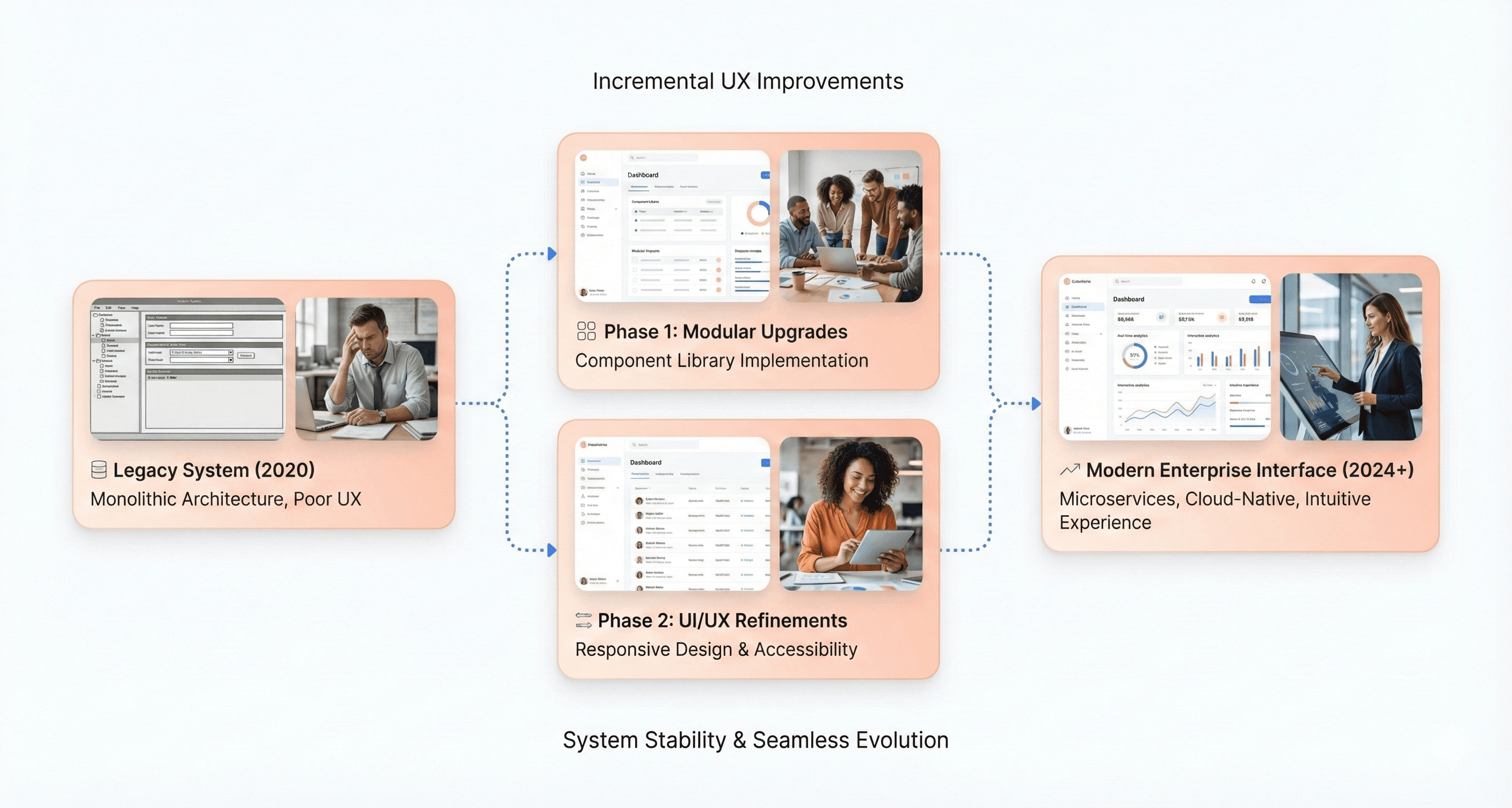
Your legacy app modernization must carefully balance system stability with meaningful UX enhancements. You should adopt an incremental approach that honors your existing users' goals while systematically updating outdated elements that hinder productivity.
Preserve design elements and workflows that currently function well while targeting specific areas that cause the most user frustration. This selective approach ensures you don't disrupt established user behaviors while addressing the most critical usability problems.
You should implement modern design systems with baseline components that provide consistency without requiring complete system rewrites. By updating visual styles, replacing confusing terminology, and introducing conventional interaction patterns gradually, you can significantly improve user experience while maintaining the system stability your organization depends on.
Focus on validating each change through iterative development and testing to ensure improvements don't compromise existing functionality or user workflows that have proven effective over time.
Conclusion
Legacy app UX problems aren't insurmountable challenges, they're opportunities waiting for strategic action. Whether you're dealing with outdated navigation, poor visual hierarchy, or accessibility gaps, you can start making meaningful improvements today without waiting for a complete overhaul. Quick wins like clarifying labels, improving contrast, and updating confusing microcopy can immediately reduce user frustration and build momentum for larger initiatives.
The key is balancing immediate relief with long-term vision. While quick fixes address urgent usability issues and demonstrate value to stakeholders, strategic modernization ensures your legacy applications can evolve with changing business needs and user expectations. Don't let the complexity of enterprise constraints paralyze your progress—start with the changes you can control today, measure their impact, and use those successes to build the case for more comprehensive UX investments tomorrow.
Your legacy app is bleeding users, frustrating employees, and costing your business money. Every clunky interface, confusing navigation flow, and outdated visual design pushes people away from the software they need to use daily.
This guide is for product managers, UX designers, and business leaders dealing with legacy applications that perform poorly but can't be rebuilt overnight. You're stuck between user complaints and budget constraints, searching for practical ways to improve without starting from scratch.
We'll explore why legacy apps create UX problems that hurt business performance and examine the root causes behind these failures. You'll discover quick UX improvements that don't require full redesigns – simple changes that deliver immediate results. Finally, we'll cover strategic solutions for long-term legacy app modernization that help you plan sustainable improvements while working within real-world constraints.
Your legacy software doesn't have to stay broken. Small, smart changes can make a big difference for your users and your bottom line.
Why Legacy Apps Create UX Problems That Hurt Business Performance
How Legacy Constraints Limit Modern Design Decisions
Your legacy applications carry decades of architectural decisions that create invisible walls around modern UX design. When you're dealing with enterprise software built years ago, you're essentially working within the constraints of ancient specifications - much like how the size of Roman horse chariots ultimately determined the dimensions of Space Shuttle booster rockets.
These legacy constraints force your UX designers to work backwards from existing functionality rather than forward from user needs. Your development teams can't simply implement modern design patterns because the underlying architecture wasn't built to support them. Instead of creating intuitive interfaces, you're stuck patching together workarounds that maintain backward compatibility while trying to improve usability.
The most precise interface might be a command line, but your users need graphical interfaces that don't require learning complex syntax. However, your legacy systems often trap you between these two extremes - too complex for intuitive use, yet not powerful enough for expert users to work efficiently.
The Hidden Costs of Poor Enterprise Software Usability
Your organization faces substantial financial impact when legacy app UX problems persist across your business operations. While you might think legacy systems are "cheap" because they're already paid for, the reality is that poor usability creates cascading costs throughout your organization.
Your employees struggle with complex interfaces that weren't designed with modern UX principles in mind. This leads to reduced performance as your staff spends more time figuring out how to accomplish basic tasks rather than focusing on their actual work. You'll find that:
Training becomes an ongoing expense, as you need customized programs for each legacy application
Employee productivity drops when interfaces are counterintuitive or require multiple steps for simple actions
Software adoption becomes problematic, forcing you to invest in continuous retraining programmes.
Your inability to scale training efficiently impacts your operational costs
Your Total Cost of Ownership (TCO) increases dramatically when you factor in these hidden usability costs. The specialized skills needed to maintain and train users on legacy interfaces become increasingly expensive and harder to find in today's job market.
When Backward Compatibility Becomes a User Experience Trap
Your commitment to backward compatibility often becomes the biggest obstacle to improving user experience in your legacy applications. You face the challenge that your users expect improvements, but they also resist dramatic changes that would require learning completely new interfaces from scratch.
This creates a UX trap where you can only make incremental tweaks rather than implementing comprehensive design improvements. Your users have become familiar with existing workflows, even if those workflows are inefficient or counterintuitive by modern standards. When companies like Microsoft tried to dramatically change Windows 8 by removing the familiar toolbar and start button, user backlash forced them to restore these elements in Windows 10.
Your organization likely follows the mentality of "if it ain't broken, don't fix it," especially when dealing with expensive systems that still function adequately. This conservative approach means you maintain outdated user interfaces simply because changing them would disrupt established user habits, even when those interfaces significantly hamper productivity.
How Complex Customization Requirements Create Interface Chaos
Your enterprise software's customization capabilities, while valuable for business processes, create significant UX challenges that compound over time. Every implementation of your legacy application ends up looking completely different across departments or client organizations, making it impossible to create standardized training materials or consistent user experiences.
Your customization requirements force you to accommodate countless use cases across multiple sectors, making interface simplification nearly impossible. Unlike consumer software designed for specific user personas, your enterprise applications must serve diverse user types with varying skill levels and requirements. This leads to interfaces cluttered with options and features that may be crucial for some users but overwhelming for others.
Your complex ecosystem includes additional infrastructure components that aren't up to date, creating further constraints on interface design. You may lack the internal expertise to update outdated technology because the original implementers have moved on, leaving you with systems that limit your ability to modernise the user experience. These legacy systems increase ownership costs as your administrators manage multiple overlapping systems simultaneously, creating interface inconsistencies that confuse users and reduce overall efficiency.
The Root Causes Behind Legacy App UX Failures
Misaligned User Personas Between Buyers and End Users
You're likely dealing with a fundamental disconnect in your legacy app development process. The people purchasing your enterprise software are rarely the same individuals who will actually use it day-to-day. This buyer-user gap creates a massive legacy app UX problem that continues to plague organizations.
When managers, shareholders, and department heads make software decisions, they naturally prioritize features that demonstrate business value over usability concerns. Your actual users – the employees who spend hours navigating these systems – find themselves stuck with interfaces designed around executive priorities rather than their workflow needs.
This misalignment becomes particularly problematic because the essential user research process that drives effective UX design gets severely compromised. You can't gather meaningful insights about user demographics and their unique problems when the decision-makers aren't the ones experiencing daily friction points. The result is legacy software that seems completely unaware of your users' actual needs.
Over-Engineered Solutions That Prioritize Features Over Usability
Your legacy applications suffer from feature bloat that directly undermines user experience. When multiple stakeholders get involved in the design process, you end up with overloaded interfaces packed with redundant options and complex layouts that make essential functions nearly impossible to discover.
This over-engineering manifests in several ways that hurt your legacy app user experience. You'll find too many menus cluttering your interface, critical functions buried within deep hierarchies, and inefficient search and filtering capabilities that leave users frustrated. Common tasks that should take seconds now require excessive clicks through complicated workflows.
The problem compounds when your legacy system tries to accommodate everyone's requests simultaneously. Rather than progressive disclosure that shows only relevant features when needed, you get everything-everywhere-all-at-once interfaces that overwhelm users and slow down productivity.
Outdated Security and Stability Requirements That Limit Innovation
Your legacy applications are trapped by security frameworks and stability requirements that were established decades ago. These systems were originally implemented as "forever solutions" without considering the user experience implications of their rigid structures.
The challenge you face is that updating enterprise systems involves significant risk factors. When you attempt to implement new design changes, there's always the possibility of breaking older parts of your software, which could disrupt critical business operations. This creates a conservative environment where decision-makers opt for safer but less innovative designs rather than pursuing meaningful UX improvements.
Your stakeholders resist experimentation because time costs money, and they can't easily see empirical data proving that UX investments deliver returns. This resistance to change keeps your legacy apps locked in outdated interface patterns that fail to meet modern user expectations.
Legacy System Dependencies That Block Modern Interface Updates
You're constrained by the interconnected nature of your legacy systems. These platforms comprise several integrated tools and programs that should run seamlessly together, but their dependencies make interface modernization extremely challenging.
The reality you're dealing with is that completely scrapping old software and starting fresh would often be more beneficial and less time-consuming. However, integration issues rarely allow this approach. Instead, you must work within the confines of existing legacy system dependencies to create new, functional interfaces without breaking critical connections.
Your users themselves sometimes create additional resistance to change. It's common for employees to resist learning new systems when their current tools "work well enough," even if those systems have glaring flaws. This user pushback, combined with technical constraints, creates a perfect storm that blocks modern interface updates.
The lengthy release cycles compound this problem further. It can take years to design and develop updates for enterprise systems, particularly when you must repeatedly integrate small changes that need careful testing to ensure they don't accidentally break attached programs. By the time your improvements are implemented, they may already be outdated compared to modern UX standards.
Quick UX Improvements That Don't Require Full Redesigns
Streamline Navigation and Reduce Cognitive Overload
Legacy apps often suffer from bloated, outdated navigation structures that leave users feeling lost and overwhelmed. You can quickly address these legacy app UX problems by implementing targeted fixes that don't require complete rebuilds.
Start by renaming navigation labels for clarity. Replace vague terms like "Documents" with specific, context-aware labels such as "Patient Records" or "Project Files" that match your users' mental models. Remove rarely used or outdated menu items that only add clutter and confusion to your legacy application user experience.
Add visual hierarchy to your navigation by implementing section headings, icons, or logical groupings. This helps users understand the relationship between different areas of your application. If your legacy app lacks breadcrumb trails, introduce them to help users understand their current location within the system.
Consider implementing a layered navigation approach similar to successful modern apps. Use a persistent sidebar for core modules, a top horizontal menu for task-focused actions, and contextual dropdowns to separate different types of content. This prevents any single navigation area from becoming overcrowded and helps users maintain their sense of control when moving through your legacy system.
Improve Visual Hierarchy to Guide User Attention
Many outdated software UX issues stem from interfaces that present all information with equal visual weight, overwhelming users with too much data at once. You can dramatically improve user focus through strategic visual hierarchy improvements.
Increase contrast between headers and body text to make content scanning easier. Use generous spacing and logical groupings to chunk related information together, making complex screens more digestible. Highlight key actions like "Submit" or "Next" buttons with distinct styling that draws user attention to primary tasks.
Suppress rarely used fields or secondary actions by using smaller fonts, lighter colors, or collapsible sections. This reduces visual noise while keeping functionality accessible when needed. Apply consistent typographic styling throughout your application, use larger, bold text for section headers and smaller, lighter weights for subheadings and labels.
Structure your layouts to guide user focus naturally. Body text should remain minimal and functional, letting clear headings direct attention to the most important sections. This approach helps users absorb information quickly and understand content priorities without requiring extensive training.
Update Confusing Language and Eliminate Technical Jargon
Outdated microcopy is a silent killer in legacy application user experience, often featuring formal, vague language or technical jargon that no longer reflects how users think or communicate.
Replace system-centric jargon with plain language that users actually understand. Transform phrases like "Initiate Action Sequence" into simple "Start Process" commands. Convert technical terms into user-friendly language that matches your audience's vocabulary and experience level.
Add helpful tooltips or inline guidance near complex features to provide context without cluttering the interface. Rewrite error messages to be friendly, clear, and actionable rather than displaying cryptic system codes or blame-oriented language.
Focus on creating user-centric labels that describe benefits or outcomes rather than internal system functions. Instead of "Database Query Module," use "Search Customer Records." This shift helps users immediately understand what each feature accomplishes and how it relates to their goals.
Fix Basic Accessibility Issues for Better Usability
Many legacy systems predate modern accessibility standards or ignored them altogether during development. You don't need to wait for a complete redesign to start improving legacy system modernization through basic accessibility fixes.
Improve text contrast ratios to ensure better readability across different devices and lighting conditions. Add descriptive alt text to important images and icons so screen readers can convey meaningful information to users with visual impairments.
Ensure form labels are properly associated with their corresponding inputs using the "for" attribute. This simple change makes forms much more usable for both assistive technology users and people using touch devices, as clicking labels will activate the associated form fields.
Add proper focus states and keyboard navigation support where missing. Implement clear visual indicators when users tab through interactive elements, and ensure all functionality is accessible without a mouse. These improvements benefit everyone, not just users with disabilities, by providing multiple ways to interact with your legacy application.
Strategic Solutions for Long-Term Legacy App Modernization
Implement In-App Performance Support to Bridge Usability Gaps
When modernizing legacy applications, you can dramatically improve user experience without complete system overhauls by implementing in-app performance support. This approach helps bridge the gap between your legacy system's limitations and your users' contemporary expectations.
You should focus on adding contextual guidance directly within your existing application interface. This means providing tooltips, guided tours, and inline help that explains outdated design patterns or complex workflows that users struggle with. By overlaying modern support elements onto your legacy interface, you can reduce the confusion caused by obsolete terminology and non-conventional interactions without requiring backend changes.
Consider implementing progressive disclosure techniques where you reveal information gradually rather than overwhelming users with complex legacy interfaces all at once. This approach particularly benefits systems that accumulated design compromises over time, helping users navigate efficiently despite the underlying system's limitations.
Use Lightweight Testing to Identify High-Impact Problem Areas
Your legacy app modernization strategy should begin with systematic user research to understand what truly needs fixing. Following proven methodologies, you should conduct semi-structured interviews and usability tests to discover the most critical tasks your users need to accomplish and identify their primary pain points.
Focus your testing efforts on understanding how users have adapted to your current system's mental model, even when it's cumbersome or inefficient. Through comprehensive interface audits and task flow analysis, you can pinpoint dozens of improvement opportunities without requiring extensive development resources.
You should prioritize testing that validates both problems and solutions iteratively. This means conducting multiple usability tests per year with diverse user groups to ensure your proposed changes improve the overall experience while preserving the original business value that made your legacy system valuable.
Build Business Cases for Gradual UX Investments
Your approach to legacy system modernization should emphasize preserving existing business value while demonstrating clear returns on UX investments. You need to understand your legacy application's original business value and communicate how UX improvements can restore or even increase that value.
When building your business case, focus on measurable outcomes like reduced context switching, decreased user errors, and improved task completion efficiency. You should highlight how modernizing front-end technology enables improvements to mobile interfaces, high-resolution displays, and accessibility compliance—all of which expand your system's reach and regulatory compliance.
Present your modernization as an investment in user productivity and system longevity rather than just cosmetic updates. Emphasize how updated design patterns and modern tooling can reduce maintenance costs while improving user satisfaction and adoption rates.
Balance Stability Requirements with User Experience Improvements
Your legacy app modernization must carefully balance system stability with meaningful UX enhancements. You should adopt an incremental approach that honors your existing users' goals while systematically updating outdated elements that hinder productivity.
Preserve design elements and workflows that currently function well while targeting specific areas that cause the most user frustration. This selective approach ensures you don't disrupt established user behaviors while addressing the most critical usability problems.
You should implement modern design systems with baseline components that provide consistency without requiring complete system rewrites. By updating visual styles, replacing confusing terminology, and introducing conventional interaction patterns gradually, you can significantly improve user experience while maintaining the system stability your organization depends on.
Focus on validating each change through iterative development and testing to ensure improvements don't compromise existing functionality or user workflows that have proven effective over time.
Conclusion
Legacy app UX problems aren't insurmountable challenges, they're opportunities waiting for strategic action. Whether you're dealing with outdated navigation, poor visual hierarchy, or accessibility gaps, you can start making meaningful improvements today without waiting for a complete overhaul. Quick wins like clarifying labels, improving contrast, and updating confusing microcopy can immediately reduce user frustration and build momentum for larger initiatives.
The key is balancing immediate relief with long-term vision. While quick fixes address urgent usability issues and demonstrate value to stakeholders, strategic modernization ensures your legacy applications can evolve with changing business needs and user expectations. Don't let the complexity of enterprise constraints paralyze your progress—start with the changes you can control today, measure their impact, and use those successes to build the case for more comprehensive UX investments tomorrow.
Stuck with slow releases and high IT costs?
▶︎
Launch 2.5x faster with our AI-driven frontend workflows, specialized for SaaS.
▶︎
Cut IT costs by up to 50% and boost user adoption by 2x with our proprietary frameworks.
Stuck with slow releases and high IT costs?
▶︎
Launch 2.5x faster with our AI-driven frontend workflows, specialized for SaaS.
▶︎
Cut IT costs by up to 50% and boost user adoption by 2x with our proprietary frameworks.
Stuck with slow releases and high IT costs?
▶︎
Launch 2.5x faster with our AI-driven frontend workflows, specialized for SaaS.
▶︎
Cut IT costs by up to 50% and boost user adoption by 2x with our proprietary frameworks.
Frequently Asked Questions
We're ready to answer your questions
Slow releases, clunky dashboards, and frustrated users? You've got questions about how to fix them. We have the Frontend-First answers that unlock growth. Let's talk solutions.
Legacy applications have poor user experience because they were built with outdated architectures, limited design flexibility, and business-driven priorities rather than user-centered design. Over time, feature bloat, backward compatibility, and technical debt make interfaces harder to use and maintain.
Answer
Why do legacy applications have poor user experience?
Question
Bad legacy app UX reduces employee productivity, increases training costs, causes user errors, and lowers software adoption. These usability issues raise the total cost of ownership and directly impact operational efficiency and business performance.
Answer
How does bad legacy app UX impact business performance?
Question
Yes, legacy app UX can be improved without a full rebuild by simplifying navigation, improving visual hierarchy, updating microcopy, fixing accessibility issues, and adding in-app guidance. These incremental changes deliver immediate usability gains with low risk.
Answer
Can you improve legacy app UX without rebuilding the system?
Question
Quick UX wins for legacy software include clarifying navigation labels, reducing interface clutter, improving contrast and readability, replacing technical jargon with plain language, and ensuring keyboard and screen-reader accessibility.
Answer
What are quick UX wins for legacy enterprise software?
Question
A company should consider long-term legacy app modernization when usability issues affect productivity, maintenance costs rise, security updates become difficult, or the system can no longer support modern user expectations and business growth.
Answer
When should a company consider long-term legacy app modernization?
Question
Frequently Asked Questions
We're ready to answer your questions
Slow releases, clunky dashboards, and frustrated users? You've got questions about how to fix them. We have the Frontend-First answers that unlock growth. Let's talk solutions.
Legacy applications have poor user experience because they were built with outdated architectures, limited design flexibility, and business-driven priorities rather than user-centered design. Over time, feature bloat, backward compatibility, and technical debt make interfaces harder to use and maintain.
Answer
Why do legacy applications have poor user experience?
Question
Bad legacy app UX reduces employee productivity, increases training costs, causes user errors, and lowers software adoption. These usability issues raise the total cost of ownership and directly impact operational efficiency and business performance.
Answer
How does bad legacy app UX impact business performance?
Question
Yes, legacy app UX can be improved without a full rebuild by simplifying navigation, improving visual hierarchy, updating microcopy, fixing accessibility issues, and adding in-app guidance. These incremental changes deliver immediate usability gains with low risk.
Answer
Can you improve legacy app UX without rebuilding the system?
Question
Quick UX wins for legacy software include clarifying navigation labels, reducing interface clutter, improving contrast and readability, replacing technical jargon with plain language, and ensuring keyboard and screen-reader accessibility.
Answer
What are quick UX wins for legacy enterprise software?
Question
A company should consider long-term legacy app modernization when usability issues affect productivity, maintenance costs rise, security updates become difficult, or the system can no longer support modern user expectations and business growth.
Answer
When should a company consider long-term legacy app modernization?
Question
Frequently Asked Questions
We're ready to answer your questions
Slow releases, clunky dashboards, and frustrated users? You've got questions about how to fix them. We have the Frontend-First answers that unlock growth. Let's talk solutions.
Legacy applications have poor user experience because they were built with outdated architectures, limited design flexibility, and business-driven priorities rather than user-centered design. Over time, feature bloat, backward compatibility, and technical debt make interfaces harder to use and maintain.
Answer
Why do legacy applications have poor user experience?
Question
Bad legacy app UX reduces employee productivity, increases training costs, causes user errors, and lowers software adoption. These usability issues raise the total cost of ownership and directly impact operational efficiency and business performance.
Answer
How does bad legacy app UX impact business performance?
Question
Yes, legacy app UX can be improved without a full rebuild by simplifying navigation, improving visual hierarchy, updating microcopy, fixing accessibility issues, and adding in-app guidance. These incremental changes deliver immediate usability gains with low risk.
Answer
Can you improve legacy app UX without rebuilding the system?
Question
Quick UX wins for legacy software include clarifying navigation labels, reducing interface clutter, improving contrast and readability, replacing technical jargon with plain language, and ensuring keyboard and screen-reader accessibility.
Answer
What are quick UX wins for legacy enterprise software?
Question
A company should consider long-term legacy app modernization when usability issues affect productivity, maintenance costs rise, security updates become difficult, or the system can no longer support modern user expectations and business growth.
Answer
When should a company consider long-term legacy app modernization?
Question
About the author
Author Name:
Parth G
|
Founder of
Hashbyt
I’m the founder of Hashbyt, an AI-first frontend and UI/UX SaaS partner helping 200+ SaaS companies scale faster through intelligent, growth-driven design. My work focuses on building modern frontend systems, design frameworks, and product modernization strategies that boost revenue, improve user adoption, and help SaaS founders turn their UI into a true growth engine.
Follow the expert:

Related Blogs
Related Blogs
Is a clunky UI holding back your growth?
Is a clunky UI holding back your growth?
▶︎
Transform slow, frustrating dashboards into intuitive interfaces that ensure effortless user adoption.
▶︎
Transform slow, frustrating dashboards into intuitive interfaces that ensure effortless user adoption.

Is a clunky UI holding back your growth?
Is a clunky UI holding back your growth?
▶︎
Transform slow, frustrating dashboards into intuitive interfaces that ensure effortless user adoption.
▶︎
Transform slow, frustrating dashboards into intuitive interfaces that ensure effortless user adoption.
Is a clunky UI holding back your growth?
Is a clunky UI holding back your growth?
▶︎
Transform slow, frustrating dashboards into intuitive interfaces that ensure effortless user adoption.
▶︎
Transform slow, frustrating dashboards into intuitive interfaces that ensure effortless user adoption.